Each guide says which plan it needs. Free is included with every install; the 90-day trial gives you full Premium features.
Turn Bio on
All plans
Breeze Bio runs on your own storefront as a theme app embed, so it needs switching on once before anything shows. Your bio then opens over your own store pages.
Open Breeze Bio from your Shopify admin and go to Getting Started.
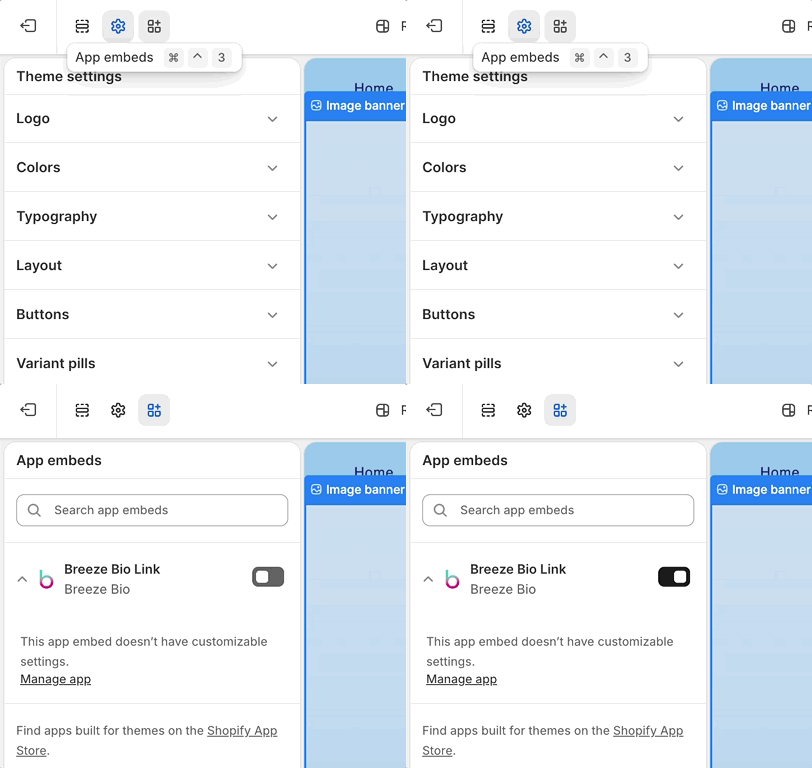
Click Open theme editor and turn it on. This takes you straight to your theme editor with App embeds open.
Switch Breeze Bio on, then save your theme.
Visit your storefront to check that your bio opens.
In your theme editor, open App embeds from the toolbar.
Prefer to do it by hand? In your theme editor, open App embeds and turn Breeze Bio on.
If your store is password-protected, your bio can still show on it on the Trial and Premium plans.
Build your bio page
All plans
A bio page can hold links, media embeds, a social icon shelf, and product and collection cards with add to cart built in, so visitors can buy without leaving your bio.
Open Breeze Bio and choose the page you want to edit.
Add your links, and any media embeds you want to show.
Add your social icons so visitors can find you elsewhere.
Add product and collection cards from your Shopify store. Visitors can add products to their cart without leaving your bio.
Open your storefront to check how it looks.
Screenshot to come: the bio page editor with a few blocks added
Your share button can have its own preview image and title, so your link looks right when someone shares it. This works on every plan.
Banners
Trial and Premium
A banner is a card with a title, some body text and a button. It's useful for a new release, a launch or a piece of news you want to stand out.
Add a banner to your page.
Give it a title and some body text.
Add a button and set what it says and where it takes visitors.
Screenshot to come: a banner block in the editor and how it looks on your storefront
Collect sign-ups and lock content
Trial and Premium
Add an email sign-up to your page, and choose to lock a block until a visitor signs up or enters your unlock code.
Add an email sign-up to your page.
If you'd like phone numbers too, switch on the optional phone step. It's asked after the email step.
To lock a block, choose to require an unlock. Visitors can unlock it by signing up with their email, or by entering your page's unlock code.
Check Customers in your Shopify admin. Every sign-up becomes a customer there, so you can use it with Klaviyo, Mailchimp or whatever you already use.
Screenshot to come: sign-up settings and a locked block
Breeze Bio saves a phone number to the customer in your Shopify admin. It never sends text messages itself.
Discount codes
Trial and Premium
A discount code block lets visitors reveal a code on your bio page, and the code is applied to their cart automatically.
Create the code in Shopify first. The code in your block must exist and be active in Shopify. If it doesn't, checkout won't apply any discount.
Set it up
In your Shopify admin, go to Discounts and create your discount code.
In Breeze Bio, add a discount code block to your page.
Choose your code. Either pick it from the dropdown of your active and scheduled Shopify codes, or paste it in exactly as it appears in Shopify.
Decide how visitors get the code. By default they slide to unveil: they slide a handle across the block and the code appears with a copy icon.
Or tick Require unlock to view this code. The code stays hidden until the visitor signs up with their email or enters your page's unlock code. This option only appears when your page collects email sign-ups.
Add the finishing touches (all optional):
Description under the code, for example "Code expires on X/X/20XX - one time use only".
Hide this block after a date. If you picked a Shopify code, this is filled in from that code's own end date. After the date the block disappears and the code is no longer released.
Slider text of your own, up to 40 characters. The default is "Slide to unveil".
Shop now button under a revealed code. By default it closes your bio page. You can send visitors to a product or collection instead.
Fireworks when the block unlocks.
Screenshot to come: the discount code block form
Screenshot to come: slide to unveil, then the revealed code
What your visitors see
Once a code is visible, it's applied to their cart automatically. The note "Applied automatically at checkout" appears under the code.
The discount shows at checkout. It doesn't appear on the cart page.
A revealed code stays revealed for about two hours in that visitor's browser.
Can't see your Shopify codes in the dropdown? The dropdown needs a read-only "read discounts" permission. Shopify asks you to approve it after an app update. Until you do, you can still type or paste your code in.
Countdowns and fireworks
Trial and Premium
Count down to a drop, and celebrate when it opens.
Open the block you want to count down to. You can add a countdown timer to any type of block.
Switch on the countdown and set the date and time it should finish.
Require unlock switches on automatically. A countdown needs the block to stay locked until the time arrives, and the block opens when the countdown reaches zero.
Optional: switch on fireworks. You can add them to any block that unlocks.
Screenshot to come: countdown settings and a block counting down
Read your Dashboard
All plans
Your Dashboard shows views, clicks and sign-ups for your bio page. If you use discount code blocks, it also shows what your codes are doing.
Discount figures
Discount code reveals is how many times a code was unveiled, by slide, sign-up or unlock code. Breeze counts these itself, once per visitor per two hours, so it counts unveils rather than page views.
Sales from discount codes is the number of orders that used your discount codes, all time, taken from Shopify.
Revenue from discount codes is the order value of those orders, all time, taken from Shopify.
Screenshot to come: the Dashboard, including the discount figures
Why can sales be higher than reveals? Shopify counts every order that used the code, including people who were given it by email, a social post or a friend, not only visitors who unveiled it in your bio. For a clean read on your bio page, use a code you only share there. The two Shopify figures have an (i) icon in the app that says the same.
Ad tracking
Standard events: all plansBreeze events: Trial and Premium
Breeze Bio can send events to your ad platforms, so you can see what your bio page does for your ads. Here is every event it sends and what each one means. For all events across Breeze Bio and Breeze Catalogue, see Tracking events.
Standard events (every plan)
These use each platform's own event names, so your ad platforms recognise them as sign-ups and add to carts.
Sign-up means a visitor signs up with their email, or unlocks content with your page's unlock code. Sent as:
Meta: CompleteRegistration
TikTok: CompleteRegistration
GA4: sign_up
Snapchat: SIGN_UP
Add to cart means a visitor adds a product to their cart from your bio. Sent as:
Meta: AddToCart
TikTok: AddToCart
GA4: add_to_cart
Snapchat: ADD_CART
Reddit: AddToCart
Breeze events (Trial and Premium)
Breeze's own events all start with B2_, so they're easy to spot in your ad platform's reports. Each one is sent to Meta, TikTok and GA4, and to Reddit from the browser. Snapchat is left out because it rejects custom event names.
Event
What it means
B2_view
Your bio page was opened. This counts once per visit.
B2_link_click
A visitor clicked a link or social icon in your bio.
B2_discount_reveal
A visitor unveiled a discount code, by slide, sign-up or unlock code. It's counted once per code, per visitor, every two hours.
Breeze doesn't send page-view events, so your ad platforms don't double-count what Shopify already sends from your storefront.
Consent
Every marketing event respects your visitor's Shopify marketing consent. Sending events from the server (the Conversions API) is optional and needs your own access tokens.
FAQ
Questions merchants ask
Setup
I installed Bio but nothing shows on my storefront. Why?
The most common cause: the theme app embed isn't switched on yet. Open your Shopify theme editor, go to App embeds, and turn Breeze Bio on. Bio's dashboard has a one-click shortcut for this. Step-by-step guide.
Where does my bio appear?
Your bio runs on your own storefront and opens over your own store pages, so there's no separate site to manage.
Can I show my bio on a password-protected store?
Yes, on the Trial and Premium plans. It isn't available on the Free plan.
Discount codes
My discount isn't applying at checkout. Why?
The code in your block must exist and be active in Shopify. If it doesn't, checkout won't apply any discount. Check it under Discounts in your Shopify admin. Also remember the discount shows at checkout, not on the cart page.
Why can't I see my Shopify codes in the dropdown?
The dropdown needs a read-only "read discounts" permission, which Shopify asks you to approve after an app update. Until you approve it, you can still type or paste your code in exactly as it appears in Shopify.
Can I hide the code until someone signs up?
Yes. Tick "Require unlock to view this code" and the code stays hidden until the visitor signs up with their email or enters your page's unlock code. This option only appears when your page collects email sign-ups.
How long does a revealed code stay visible?
About two hours in that visitor's browser.
Can I make a code stop showing on a certain date?
Yes. Use "Hide this block after" and pick a date. If you chose a Shopify code, the date is filled in from that code's own end date. After the date the block disappears and the code is no longer released.
Can I change the "Slide to unveil" text?
Yes, you can set your own slider text of up to 40 characters.
Where does the "Shop now" button go?
By default it closes your bio page. You can instead send visitors to a product or collection of your choice.
Which plans include discount codes?
Discount code blocks, and unlocking by email or code, are on the Trial and Premium plans.
Sign-ups and your data
Is my fan data locked into Breeze?
No. Every signup becomes a real customer in your own Shopify admin, with consent handled the way Shopify expects. From there it syncs out to Klaviyo, Mailchimp or whatever you already use. Bio doesn't hold a separate copy you can't get to.
Does Breeze Bio send text messages?
No. If you collect phone numbers, Breeze Bio only saves the number to the customer record in your Shopify admin. It never sends texts itself.
Your Dashboard
What does "Discount code reveals" count?
How many times a code was unveiled, by slide, sign-up or unlock code. Breeze counts these itself, once per visitor per two hours, so the number is unveils, not page views.
Why are my discount sales and revenue higher than my reveals?
Those two figures come from Shopify, and Shopify counts every order that used the code, including people who were given it by email, a social post or a friend. They're also all time. For a clean read on your bio page, use a code you only share there.
Ad tracking
Which events does Breeze Bio send to my ad platforms?
On every plan: sign-up and add to cart, using each platform's own event names. On Trial and Premium you also get Breeze's own events, B2_view, B2_link_click and B2_discount_reveal, sent to Meta, TikTok and GA4, and to Reddit from the browser. Snapchat is left out of those because it rejects custom event names. See the full list and what each one means.
Does tracking respect my visitors' consent?
Yes. Every marketing event respects the visitor's Shopify marketing consent. Sending events from the server (the Conversions API) is optional and needs your own access tokens.
Plans and billing
What's included on each plan?
Every plan includes links, embeds, social icons, product cards, in-bio add to cart, and a share button with its own preview image and title. The Trial and Premium plans add banners, countdown timers, discount code blocks with email or code unlock, showing your bio on a password-protected store, and Breeze's own ad events. Premium also lets you remove the "Powered by Breeze" footer. See the pricing section for the full comparison.
How does billing actually work?
Premium runs through Shopify's own billing — $10/month or $99/year, charged to whatever payment method your store already has on file. Cancel any time from your Shopify admin; no separate invoices from Breeze.
What happens during the 90-day trial?
Every install gets full Premium access for 90 days, automatically, no card entry beyond your existing Shopify billing — gated links, discount blocks and enriched embeds are all live right away. Your own affiliate codes unlock once you're on a paid subscription; during the trial, affiliate links still carry Breeze's own tag. Nothing you build gets deleted if you don't upgrade — those paid-only features simply pause until you do.
Do you take a cut of my affiliate links?
By default, yes — supported affiliate links (Amazon Associates and Shopify) carry Breeze's own tag, disclosed in our Terms, including during your free trial. Once you're on a paid Premium subscription, connect your own account and the commission is 100% yours.
Still stuck?
Get in touch
We're a small, early-stage team, so replies won't always be instant — but we read everything and get back to people as quickly as we can.